芝麻web文件管理V1.00
编辑当前文件:/home/forge/stage.sksb.smartcon-survey.com/vendor/leandrocfe/filament-apex-charts/README.md
# Filament Apex Charts [Apex Charts](https://apexcharts.com/) integration for [Filament](https://filamentphp.com/) 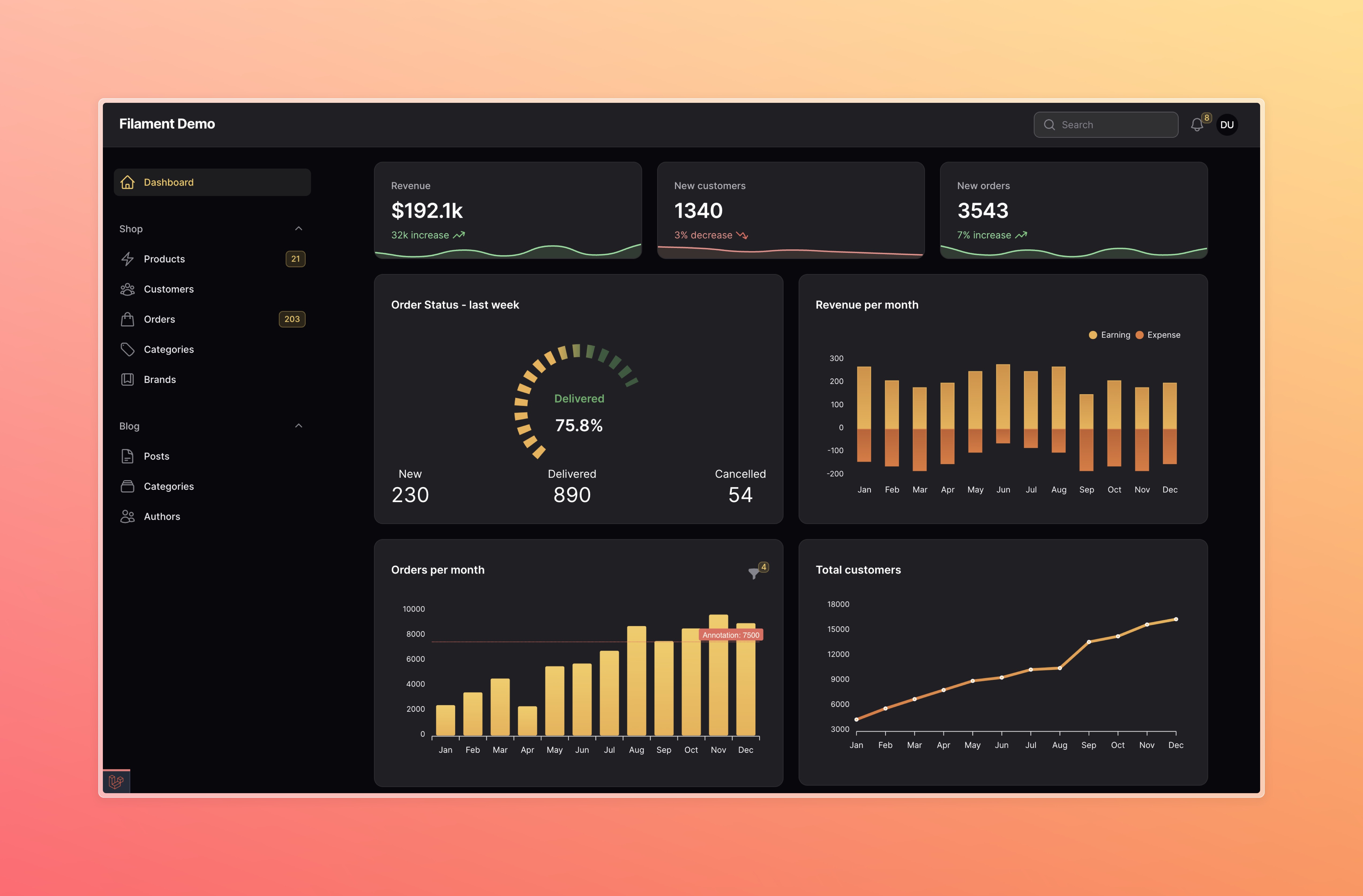 [Filament demo with ApexCharts](https://github.com/leandrocfe/filament-demo/tree/apex-charts-plugin-v3) ## Installation You can install the package via composer: ```bash composer require leandrocfe/filament-apex-charts:"^3.1" ``` Register the plugin for the Filament Panels you want to use: ```php use Leandrocfe\FilamentApexCharts\FilamentApexChartsPlugin; public function panel(Panel $panel): Panel { return $panel ->plugins([ FilamentApexChartsPlugin::make() ]); } ``` **Filament V2** - if you are using Filament v2.x, you can use [this section](https://github.com/leandrocfe/filament-apex-charts/tree/2.0.2) ## Usage Start by creating a widget with the command: ```bash php artisan make:filament-apex-charts BlogPostsChart ``` ### Available chart samples You may choose: - Area - Bar - Boxplot - Bubble - Candlestick - Column - Donut - Heatmap - Line - Mixed-LineAndColumn - Pie - PolarArea - Radar - Radialbar - RangeArea - Scatter - TimelineRangeBars - Treemap - Funnel You may also create an **empty chart** by selecting the **Empty** option. This command will create the **BlogPostsChart.php** file in _app\Filament\Widgets_. Ex: ```php namespace App\Filament\Widgets; use Leandrocfe\FilamentApexCharts\Widgets\ApexChartWidget; class BlogPostsChart extends ApexChartWidget { /** * Chart Id * * @var string */ protected static ?string $chartId = 'blogPostsChart'; /** * Widget Title * * @var string|null */ protected static ?string $heading = 'BlogPostsChart'; /** * Chart options (series, labels, types, size, animations...) * https://apexcharts.com/docs/options * * @return array */ protected function getOptions(): array { return [ 'chart' => [ 'type' => 'bar', 'height' => 300, ], 'series' => [ [ 'name' => 'BlogPostsChart', 'data' => [7, 4, 6, 10, 14, 7, 5, 9, 10, 15, 13, 18], ], ], 'xaxis' => [ 'categories' => ['Jan', 'Feb', 'Mar', 'Apr', 'May', 'Jun', 'Jul', 'Aug', 'Sep', 'Oct', 'Nov', 'Dec'], 'labels' => [ 'style' => [ 'fontFamily' => 'inherit', 'fontWeight' => 600, ], ], ], 'yaxis' => [ 'labels' => [ 'style' => [ 'fontFamily' => 'inherit', ], ], ], 'colors' => ['#f59e0b'], ]; } } ``` Now, check out your new widget in the **dashboard**. ## Available options The `getOptions()` method is used to return an array of options based on [Apex Charts Options](https://apexcharts.com/docs/options). This structure is identical with the **Apex Chart library**, which `Filament Apex Charts` uses to render charts. You may use the [Apex Chart documentation](https://apexcharts.com/docs/creating-first-javascript-chart/) to fully understand the possibilities to return from getOptions(). ## Examples - [Filament demo with ApexCharts](https://github.com/leandrocfe/filament-demo/tree/apex-charts-plugin-v3) ## Setting a widget title You may set a widget title: ```php protected static ?string $heading = 'Blog Posts Chart'; ``` Optionally, you can use the `getHeading()` method. ## Setting a widget subheading You may set a widget subheading: ```php protected static ?string $subheading = 'This is a subheading'; ``` Optionally, you can use the `getSubheading()` method. ## Setting a chart id You may set a chart id: ```php protected static string $chartId = 'blogPostsChart'; ``` ## Setting a widget height You may set a widget height: ```php protected static ?int $contentHeight = 300; //px ``` Optionally, you can use the `getContentHeight()` method. ```php protected function getContentHeight(): ?int { return 300; } ``` ## Setting a widget footer You may set a widget footer: ```php protected static ?string $footer = 'Lorem Ipsum is simply dummy text of the printing and typesetting industry.'; ``` You can also use the `getFooter()` method: Custom view: ```php use Illuminate\Contracts\Support\Htmlable; use Illuminate\Contracts\View\View; protected function getFooter(): null|string|Htmlable|View { return view('custom-footer', ['text' => 'Lorem Ipsum is simply dummy text of the printing and typesetting industry.']); } ``` ```html <!--resources/views/custom-footer.blade.php--> <div> <p class="text-danger-500">{{ $text }}</p> </div> ``` Html string: ```php use Illuminate\Contracts\Support\Htmlable; use Illuminate\Contracts\View\View; protected function getFooter(): null|string|Htmlable|View { return new HtmlString('<p class="text-danger-500">Lorem Ipsum is simply dummy text of the printing and typesetting industry.</p>'); } ``` ## Hiding header content You can hide header content by **NOT** providing these - $heading - getHeading() - $subheading - getSubheading() - getFormSchema() - getOptions() ## Filtering chart data You can set up chart filters to change the data shown on chart. Commonly, this is used to change the time period that chart data is rendered for. ### Filter forms You may use components from the [Form Builder](https://filamentphp.com/docs/2.x/forms/fields) to create custom filter forms: ```php use Filament\Forms\Components\DatePicker; use Filament\Forms\Components\TextInput; protected function getFormSchema(): array { return [ TextInput::make('title') ->default('My Chart'), DatePicker::make('date_start') ->default('2023-01-01'), DatePicker::make('date_end') ->default('2023-12-31') ]; } ``` The data from the custom filter form is available in the $this->filterFormData array. You can use the active filter form values within your `getOptions()` method: ```php protected function getOptions(): array { $title = $this->filterFormData['title']; $dateStart = $this->filterFormData['date_start']; $dateEnd = $this->filterFormData['date_end']; return [ //chart options ]; } ``` Also, if you want your chart data to update when the value of a filter changes, you have to combine `reactive()` with `afterStateUpdated()` : ```php use Filament\Forms\Components\DatePicker; use Filament\Forms\Components\TextInput; protected function getFormSchema(): array { return [ TextInput::make('title') ->default('My Chart') ->live() ->afterStateUpdated(function () { $this->updateChartOptions(); }), ... ]; } ``` ### Changing the filter form width You can change the filter form width by setting the `$filterFormWidth` property: ```php use Filament\Support\Enums\MaxWidth; protected static MaxWidth|string $filterFormWidth = MaxWidth::Medium; ``` ### Single select To set a default filter value, set the `$filter` property: ```php public ?string $filter = 'today'; ``` Then, define the `getFilters()` method to return an array of values and labels for your filter: ```php protected function getFilters(): ?array { return [ 'today' => 'Today', 'week' => 'Last week', 'month' => 'Last month', 'year' => 'This year', ]; } ``` You can use the active filter value within your `getOptions()` method: ```php protected function getOptions(): array { $activeFilter = $this->filter; return [ //chart options ]; } ``` ## Live updating (polling) By default, chart widgets refresh their data every 5 seconds. To customize this, you may override the `$pollingInterval` property on the class to a new interval: ```php protected static ?string $pollingInterval = '10s'; ``` Alternatively, you may disable polling altogether: ```php protected static ?string $pollingInterval = null; ``` ## Defer loading This can be helpful when you have slow queries and you don't want to hold up the entire page load: ```php protected static bool $deferLoading = true; protected function getOptions(): array { //showing a loading indicator immediately after the page load if (!$this->readyToLoad) { return []; } //slow query sleep(2); return [ //chart options ]; } ``` ## Loading indicator You can change the loading indicator: ```php protected static ?string $loadingIndicator = 'Loading...'; ``` You can also use the `getLoadingIndicator()` method: ```php use Illuminate\Contracts\View\View; protected function getLoadingIndicator(): null|string|View { return view('custom-loading-indicator'); } ``` ```html <!--resources/views/custom-loading-indicator.blade.php--> <div> <p class="text-danger-500">Loading...</p> </div> ``` ## Dark mode The dark mode is supported and enabled by default now. Optionally, you can disable it: ```php protected static bool $darkMode = false; ``` You can also set the theme in the getOptions method: ```php protected function getOptions(): array { return [ 'theme' => [ 'mode' => 'light' //dark ], 'chart' => [ 'type' => 'bar', ... ], ... ]; } ``` ## Extra options and Formatters You can use the `extraJsOptions` method to add additional options to the chart: ```php protected function extraJsOptions(): ?RawJs { return RawJs::make(<<<'JS' { xaxis: { labels: { formatter: function (val, timestamp, opts) { return val + '/24' } } }, yaxis: { labels: { formatter: function (val, index) { return '$' + val } } }, tooltip: { x: { formatter: function (val) { return val + '/24' } } }, dataLabels: { enabled: true, formatter: function (val, opt) { return opt.w.globals.labels[opt.dataPointIndex] + ': $' + val }, dropShadow: { enabled: true }, } } JS); } ``` ## Publishing views Optionally, you can publish the views using: ```bash php artisan vendor:publish --tag="filament-apex-charts-views" ``` ## Publishing translations Optionally, you can publish the translations using: ```bash php artisan vendor:publish --tag=filament-apex-charts-translations ``` ## Testing ```bash composer test ``` ## Changelog Please see [CHANGELOG](CHANGELOG.md) for more information on what has changed recently. ## Contributing Please see [CONTRIBUTING](CONTRIBUTING.md) for details. ## Security Vulnerabilities If you discover a security vulnerability within this package, please send an e-mail to <leandrocfe@gmail.com>. ## Credits - [Leandro Costa Ferreira](https://github.com/leandrocfe) - [All Contributors](../../contributors) ## License The MIT License (MIT). Please see [License File](LICENSE.md) for more information.